
Intel Officially Announced Its 8th Generation Core Processors For Desktops


We are already familiar with the confusion the company has created regarding the naming and generation. On August 21, they launched the 8th Gen Core processors for laptops based
on Kaby Lake Refresh, a slight improvement over the 7th Gen Kaby Lake Chips (14nm). Also, the upcoming Cannonlake 10nm chips would come under the 8th Gen family.
A part of the new Coffee Lake lineup is the Intel Core i7-8700K which the company claims it’s the best chip for gaming ever. With Turbo Boost 2.0 enabled, it’s single-core clock can be cranked up to 4.7Ghz.
According to PC World, Intel’s desktop group general manager Anand Srivasta concluded that the single-threaded performance delivered in the case of Core i7-8700K is even better than their Core i9-7800X – a 6 Core, 12 Thread chip with faster memory and extra PCIe lanes.
When compared to last year’s flagship Core i7 chip, users would be able to have around 25% more FPS for demanding games like Gears of War 4. And while editing 4K 360-degree, users would be able to do it 32% faster than Core i7-7700K and 65% faster than a 3-year old PC.
Hexa-Core Core i5 and Quad-Core Core i3
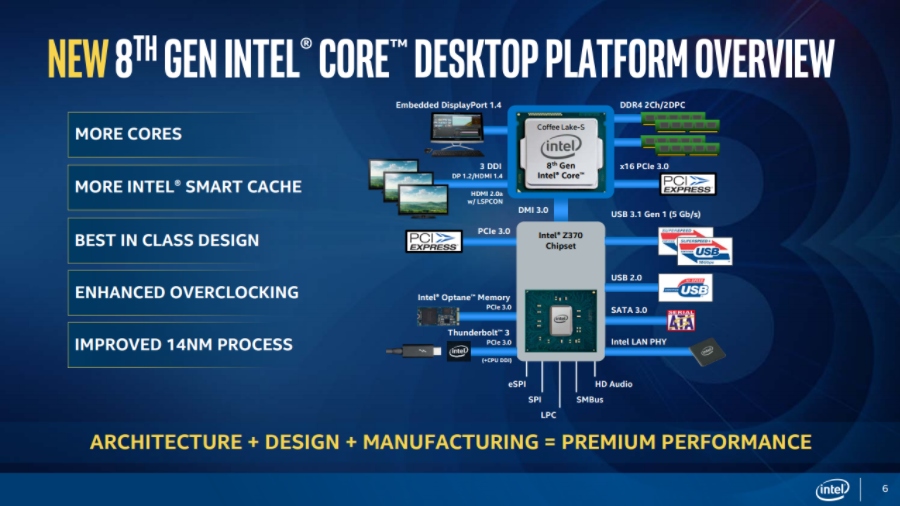
Intel Coffee Lake desktop2
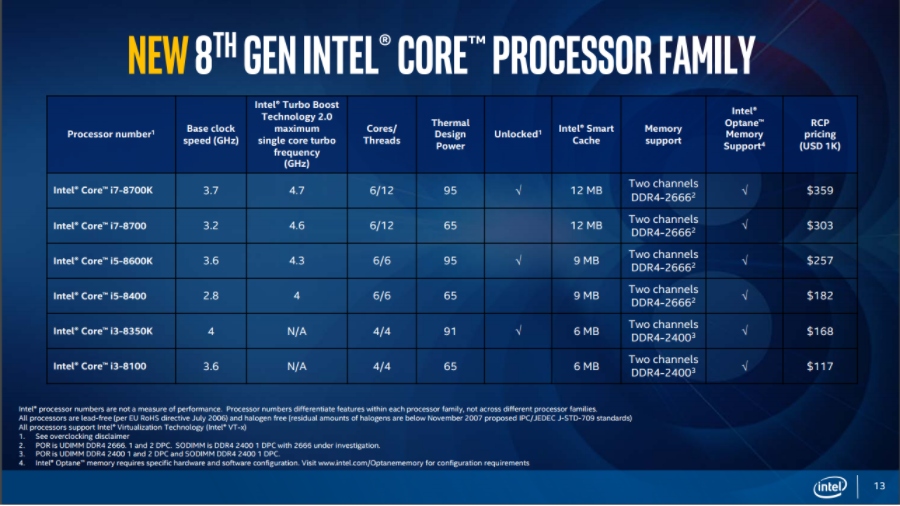
The new 8th Gen Intel Core desktop CPU lineup includes a total of 6 processors having support for Intel Optane memory. They require Intel’s 300 series chipset (currently Z370) which improves power delivery to the motherboard, helping the 6-Core chips achieve their true performance levels.
Intel Coffee Lake desktop1
Comparison of Coffee Lake Desktop Processors, Image: Intel
The new Z370 chipset also enables support for DDR4-2666 memory which was limited to DDR4-2400 in the case of Z270. For the first time, Intel has added 6 cores to the Core i5 chips and we can also see Core i3 chips with four cores.
People would be able to buy the new 8th Gen Intel Core desktop chips, including three unlocked K series processors, from October 5.

Comments

Follow Us

WHAT'S HOT

How To Connect Android or iOS Phone To Windows 10

The  Continue on PC  feature is currently available to Windows Insiders, but it’ll arrive for regular users once the update starts landing on their PCs. If you’re running an Insider build, you can use the steps mentioned in this post to connect your phone to Windows 10 PC.

Poco F2 Pro 5G Officially Launched Globally With Snapdragon 865

After months of wait, Poco has officially launched Poco F2 Pro. The phone is a sequel to the Poco F1 which was a huge success for the company back in 2018. It is also the second Poco contender in 2020. In February, the Poco brand revealed a new phone lineup and launched Poco X2. The phone was priced at Rs 15,999 and featured similar specs of Redmi K30, a Xiaomi flagship that was launched back in 2018. The company has applied the same strategy for today’s launch. As we expected, Poco F2 Pro bundles all the specs of Redmi K30 Pro that Xiaomi launched last month. Poco F2 Pro Specifications, Availability and Price Unlike the Poco X2, the phone offers a circular camera at the back and a pop-up selfie camera at the front as opposed to the regular dual-hole punch cutout on the display of Poco X2. Poco F2 Pro comes with a 6.67-inch FHD+ AMOLED display with a 92.7% screen to body ratio. On top of that, the phone has an in-display fingerprint sensor to keep up with...

Learn How To Activate iOS 11 Dark Mode

Apart from all the major iOS 11 features and changes, there are some hidden and minor features as well. In this release, Apple has included a feature named Smart Invert Colors, which is the closest you can get while looking for an iOS 11 dark mode.

Qualcomm Announces Its First 5G Network With X50 Modems

Qualcomm  published  in its official OnQ blog that the 5G data connection demonstration achieved gigabit download speeds using several 100 MHz 5G carriers. The demonstration utilized new 5G Protocol R&D Toolset and the UXM 5G Wireless Test