
How To Check If Your Windows 10 PC Supports Windows Mixed Reality


What’s different in the case of Windows MR is it combines the likes of VR and the HoloLens tech developed by Microsoft. To experience Mixed Reality, you’ll need a dedicated headset and
a PC having resources to power your virtual world. Microsoft has released new tool on the Windows Store which analyzes your PC and checks if it supports Mixed Reality.
After you run the Windows Mixed Reality PC check app, click the ‘I Agree’ button and the tool will take a few seconds to display a list of components which need to be compatible.
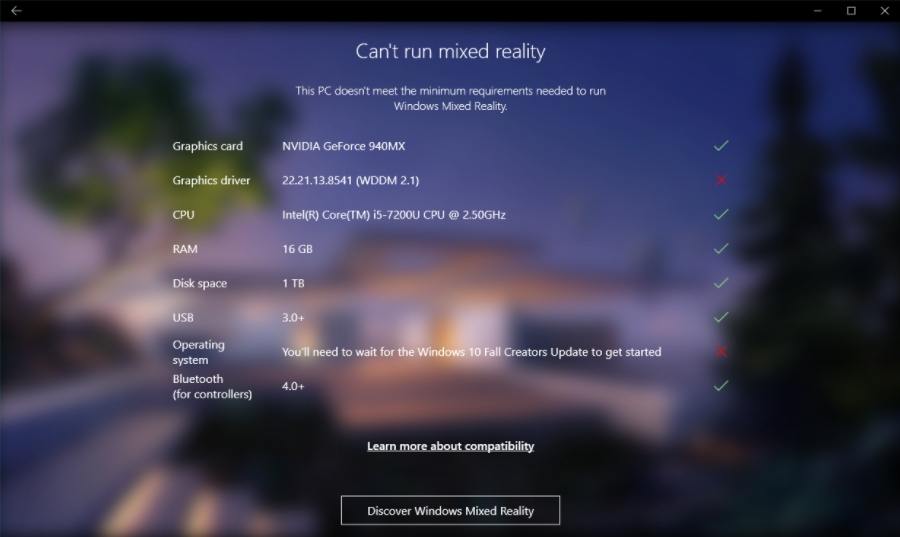
Windows Mixed Reality PC Check2
Sadly, in my case, and probably many others, I fall short on the Fall Creators Update. I hope to see positive results after future Windows updates. If you want, here are the hardware specifications laid by Microsoft for PCs to support Windows Mixed Reality.
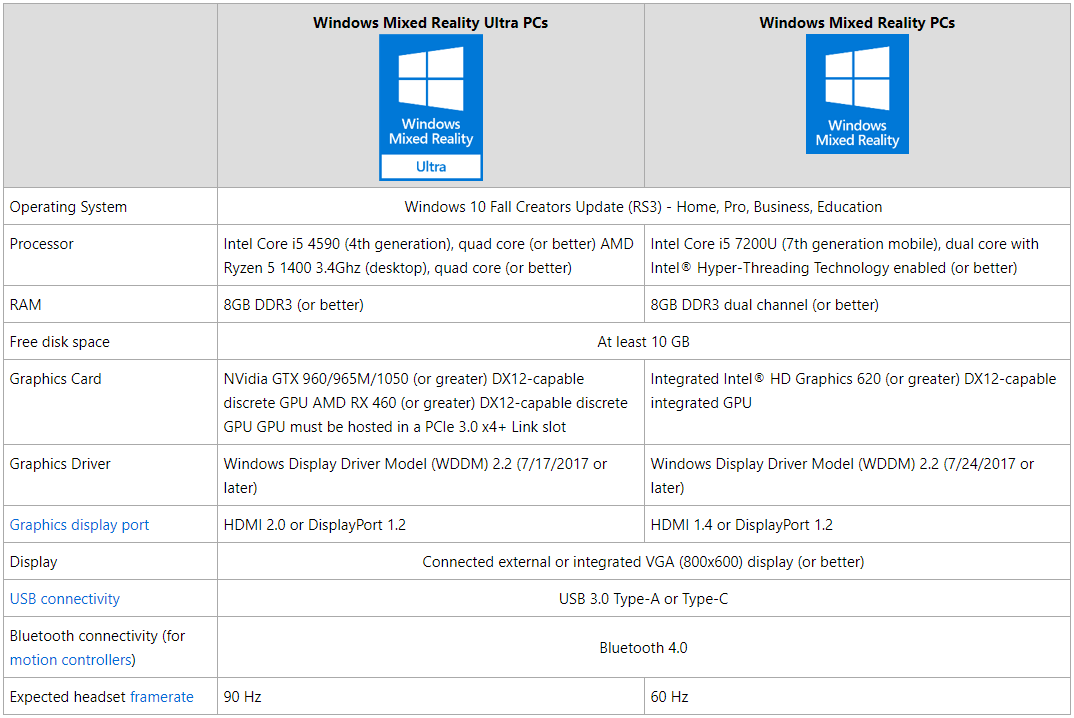
Windows Mixed Reality Check 3
You can also see them on the official website as Microsoft might make any changes in the future.
What are your views on Windows Mixed Reality? Drop your thoughts and feedback.

Comments

Follow Us

WHAT'S HOT

How To Connect Android or iOS Phone To Windows 10

The  Continue on PC  feature is currently available to Windows Insiders, but it’ll arrive for regular users once the update starts landing on their PCs. If you’re running an Insider build, you can use the steps mentioned in this post to connect your phone to Windows 10 PC.

Windows Subsystem For Linux Is Beta No More, Gets “Full Support” In Windows 10 Fall Creators Update

As we told you earlier, WSL on Windows 10  moved out of beta  in August. It still carries the beta tag in Windows 10 Creators Update. Also, it won’t require people to enable developer

Cybergadget New Dock With LAN Port For Nintendo Switch Available For Pre-order

A Japanese accessory maker Cybergadget is not very popular outside Japan, but if you are in search of a docking station for your Nintendo Switch, then take a look

Learn How To Activate iOS 11 Dark Mode

Apart from all the major iOS 11 features and changes, there are some hidden and minor features as well. In this release, Apple has included a feature named Smart Invert Colors, which is the closest you can get while looking for an iOS 11 dark mode.