
Android And iOS-Like Privacy Features Will Soon Arrive On Windows 10


Earlier this year, the company opened up about what data they collect using Windows 10. And, with the release of the Windows 10 Creators Update, they also introduced basic and full data collection levels to the users.

Now, the privacy bumps include special permission prompts for Windows 10 apps to access various components like the camera, microphone, contacts, calendar, etc. This would be the case of every new app installed after the release of the Windows 10 Fall Creators Update.
In the past, this functionality was only limited to apps asking for the device’s location, for instance, in the Maps app.
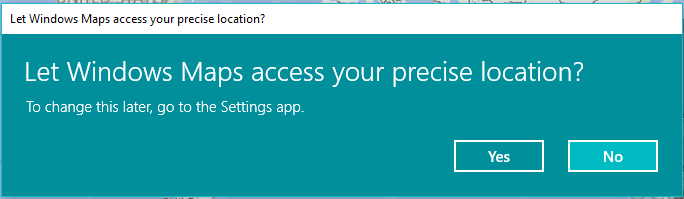
Windows 10 location prompt
Permission prompt currently appearing in the Maps app.
You might have seen such permission pop-ups on your Android or iOS devices. Just like these mobile devices, Windows 10 users would be able to revert the access permissions they have allowed for an app. The option to do the same would be available through the Settings app > Privacy.
Moreover, Microsoft would offer detailed privacy statement during the Windows installation process, giving the users a better idea of what data of theirs will be sucked by Windows.
The Fall Creators Update is scheduled for a release on October 7, 2017.

Comments

Follow Us

WHAT'S HOT

Russian Hackers Used Kaspersky Software To Steal NSA Secrets And Code

According to a  report from WSJ , NSA’s classified data, which wasn’t supposed to leave the facility’s perimeter where a contractor worked, was stolen by Russian hackers. This incident

How To Connect Android or iOS Phone To Windows 10

The  Continue on PC  feature is currently available to Windows Insiders, but it’ll arrive for regular users once the update starts landing on their PCs. If you’re running an Insider build, you can use the steps mentioned in this post to connect your phone to Windows 10 PC.

KDE Neon 5.11 Linux Distro Released- Download ISO Files Here

The major features of this release were better notifications, redesigned settings app, improved task manager, and new Vault app. Soon after this release, KDE Neon developers also shipped their brand new release, i.e., KDE Neon 5.11.

Best Android Cleaner Apps You Need To Try Out Now

Cache files pile up over time and need to be cleared. Also, junk from ads and image thumbnails take up a lot of space. Android cleaner apps do a good job of finding unnecessary files and