

Now, you won’t need to head over to other apps like Messenger and Whatsapp whenever you want to share a YouTube video. Announced on Monday, a new set of changes allows people to share YouTube videos within the app itself. It has been more than a year since the new sharing
feature is under testing.
What’s more is the ability to chat with your friends on YouTube which was a much-needed feature since years. And it might help Google establish their name in the world of messaging apps. The plans for Allo didn’t go that well; maybe YouTube can bring some good news.
Here is how you can use YouTube’s Chat feature and share videos
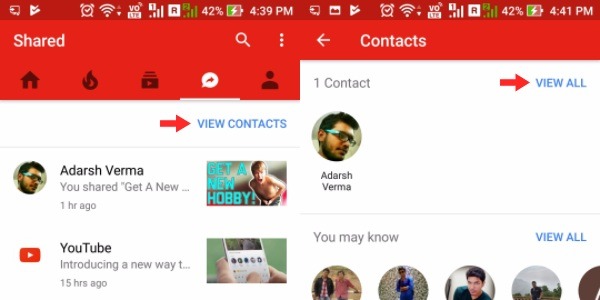
Once you open the updated YouTube app, you’ll find a new ‘Shared’ tab next to Subscriptions tab. Tapping the same would open a new screen where you can invite your contacts to use the chat feature.
Tap View Contacts > View All to displays a list of your YouTube connections. These are the ones whose email is registered in your Google Contacts.
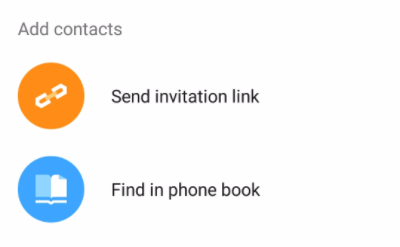
Under the Add Contacts section, you can see Find in phone book option to add the people present in your device’s contact list. The invitation to these people is sent via SMS.

Once a contact accepts your invitation, their name would appear under the Shared tab. Tap the name to open the chat interface where you can send messages and videos.
How to share videos?
To share YouTube videos through the new chat feature, you have two options. First, there is a dedicated button on the chat screen which allows you to search and add videos without leaving the conversation.
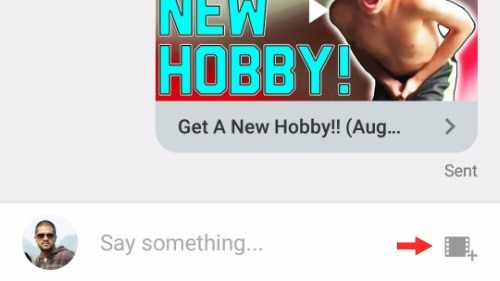
Search and select the video on the next screen.

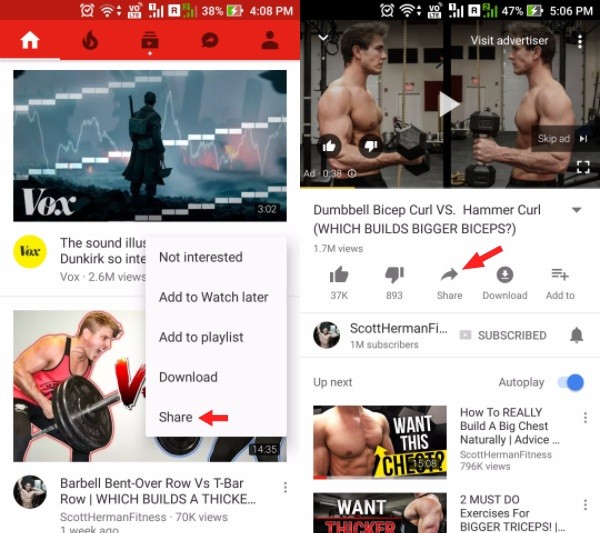
Second, for any YouTube video, you can tap the overflow menu button (three dots) and tap the Share option and then select the person. You also use the Share option while a video is playing.
You can play the shared videos on the chat screen itself. And it’s the regular YouTube player, so you can view it in full-screen mode, change quality, etc.
YouTube’s chat is not limited to a single person. You can add more people and make a group by tapping the overflow menu button in the top-right corner of the chat screen. The overflow menu also has options to mute the conversation and quit the chat.
Comments
Post a Comment