
Gone are the days when ill-famed hackers had to write their own scripts and run exploits to gain access to the computers. Today, there are tons of free and premium Trojan Development Kits (TDKs) that could be used to create malware without any prior knowledge of
programming or subtleties of hacking.
Recently, Symantec’s Dinesh Venkateshan spotted a specially crafted Android-based application that can be used to develop a functional Android ransomware. The whole process of creating the ransomware is automated with the help of a DAME (Device-Aided Malware Engineering) tool model.
This Android ransomware creation app is available on different hacking forums and Chinese social networking messaging service. The app is reported to be featuring an easy-to-use interface. Different functions available in the app are:
- Icon to be used for malware
- Key to be used to unlock the device
- Message to be displayed on the locked screen of infected device
- Custom operations to randomize the code
- Animation to be shown on infected device
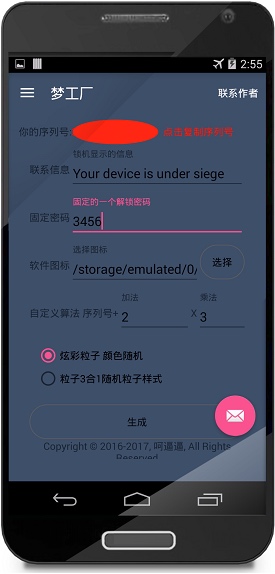 While the app is free to download and take a look at its features, when the hacker will hit the “create” button, he/she will be asked to make a one-time payment. Once the subscription is complete, the hacker can create as many ransomware versions as they want.
According to the report, the ransomware created using this process mimics the Lockdroid behavior of locking the screen. The entire process is done on the smartphone without any need to write a single piece of code.
Symantec has also listed some security measures that one can take to defeat the ransomware attacks. These measures include — regular software updates, downloading apps only from Play Store, creating a backup of data, taking a look at the requested permissions, and installing a security app.
Comments
Post a Comment