
After almost a month of testing, WhatsApp has finally made their file sharing feature truly amazing. Now, WhatsApp allows you to send files of almost any type, be it a software, Android APK, or some other format.
You can send them using the Documents options when sharing files with your contacts.
To send a particular file on Android:
- Open the Contact to which you want to send the file.
- Tap the Attachment button.
- Tap Document.
- Tap Browser other docs…
- Now, select the file you want and tap the Send button. It’ll take a while to upload the file depending on its size. To send more than one file. Long press one file and select the others.
The feature also works for WhatsApp Web making it easier to share software setup files without the pain of uploading it on some cloud storage. However, the advantage does come with a limit, you can only send files with at most 64 MB in size.
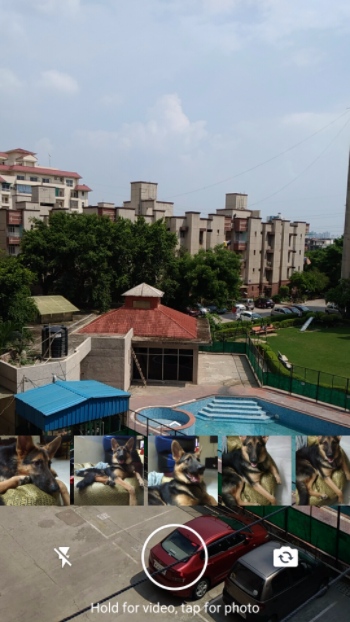
The new file sharing functionality is the part of WhatsApp’s latest update which is now available for Android and iOS. You can now directly share existing photos and videos from WhatsApp’s inbuilt camera tool. You can either swipe photos and videos from right to left on the camera screen or swipe up to get a gallery-style view.
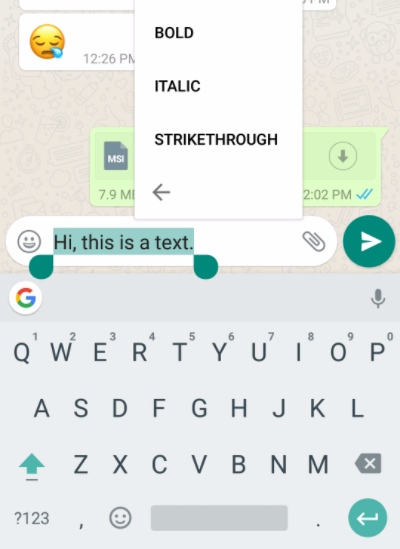
Various text formatting options like bold, italic, and strikethrough, which were activated earlier using shortcodes, can now be enabled by long-pressing the text while chatting.
WhatsApp is probably the biggest instant messaging platform with a user base of around 1 billion people across the globe. Its prime competitor is its brother Messenger.
WhatsApp has started to transform more into cross-platform messaging service with support added for desktop users last year through WhatsApp Web and standalone apps for MacOS and Windows operating systems.
Comments
Post a Comment