Android Malware: Google Have Rolled Out Their Automatic App Scanning Service Called Google Play Protect

Google Have rolled out their automatic app scanning service called Google Play Protect. What it basically does is it runs in the background on an Android device and constantly monitors apps and games for malicious stuff.
Play Protect requires the device to have Google Mobile Services 11 or higher version. Also, the apps you download from Google Play pass through Play Protect’s malware filter before they land on your device.
If something is detected, Play Protect can stop the app from running further and issue warnings in the notification area. In worst cases, it can even delete the app from your device on its own.
Google Play Protect was first announced in May at the Google I/O conference. It is not a completely new thing but a revamped of a feature known as Verify Apps. And keep in mind the thing that Play Protect is good but don’t assume it as a one stop solution. Be cautious if you regularly sideload apps on your device. Play Protect will send information about the unknown apps to Google’s servers for analysis.
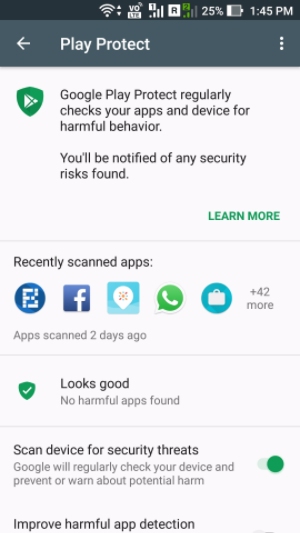
You can access Play Protect in your device settings. Go to Settings > Google > Security. There you’ll find Verify Apps or Play Protect depending on the fact. To turn Play Protect On or Off, use the toggle option called Scan device for security threats.
When the roll out finishes, you would also be able to see Play Protect in Google Play > Menu (three horizontal lines).
Comments
Post a Comment