
Fireball is a new and notorious malware in town which is targeting Windows and macOS devices. Developed by a Chinese marketing company Rafotech, Fireball takes control of the user’s web browser and generates fake advertisement clicks. It also features the power
to make any changes to the web browser and install more harmful malware. The users are advised to look for suspicious elements and add-ons in their browsers.fter WannaCry Ransomware annihilated hundreds of thousands of computers all around the world, we are witnessing the rise of another dangerous malware campaign named Fireball. Security firm Check Point Threat Intelligence discovered this high volume threat which has infected more than 250 million computers worldwide.
Originating from China, this malware has two main powers. It can run any malicious code on the victim’s computer. It can also hijack and manipulate infected users’ traffic to generate fraudulent ad revenue. The most infected countries are India (10.1%) and Brazil (9.6%).
You’ll be surprised to know that the overall Fireball malware operation is run by Rafotech, which is a large marketing agency in Beijing. The company uses Fireball malware to turn the home pages and default search engines of web browsers into fake ones.
Check Points calls browser-hijackers like Fireball hybrid creatures, which are half seemingly legitimate software and half malware. Please note that currently Rafotech uses Fireball only for generating fake internet traffic, but it can perform any typical action of a malware.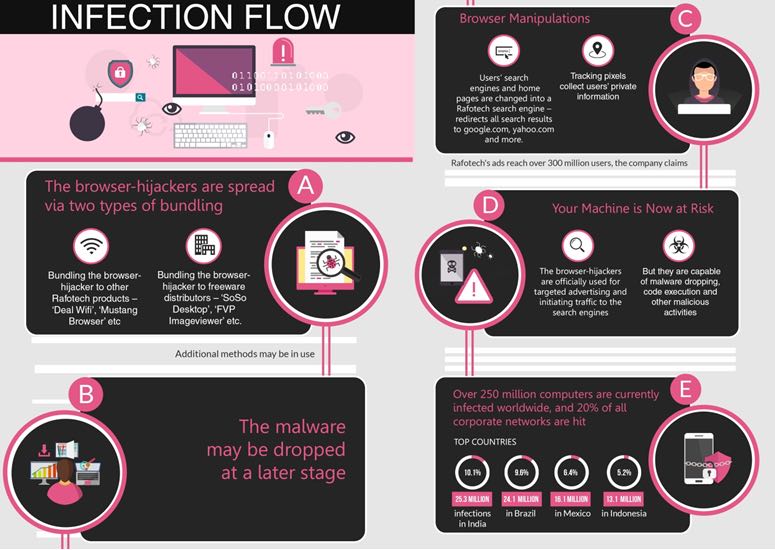
It means that Fireball has the advanced capability to direct the user to malicious websites, conduct malware dropping, and spy on them. The design on Fireball is advanced and it encompasses evasion and multi-layer anti-detection techniques. Moreover, Fireball also has a flexible C&C server.
But, how does Fireball spread? Well, with Fireball, Rafotech has managed to take the adware distribution route which is called bundling. Rafotech uses bundling of some unwanted program with a wanted program to spread Fireball.
How to know if you’re infected by Fireball?
For checking if you’re infected by Fireball malware, Check Point has laid out some simple points. If the answers to the questions asked below are no, you might be infected with adware.
First, you need to open your web browser. Take a look at the home page and default search engine–was it set by you? Can you make changes to them? Do you recognize the extension installed in your web browser?
To remove most of the adware, you simply need to remove the application from your computer. On Windows, you can do from Programs and Features list in the Windows Control Panel. On Mac, locate the Applications in Finder and drag the suspicious program to the Trash.
You are also advised to scan and clean your computer using a good antimalware and adware cleaner software. You can also look for Extensions/Add-ons list in your web browser and delete the suspicious ones.
You can read about the Fireball malware in detail here.
Comments
Post a Comment