
IXmaps: This Map Tells If Your Web Traffic Is Being Spied On By The NSA


nsa ixmaps
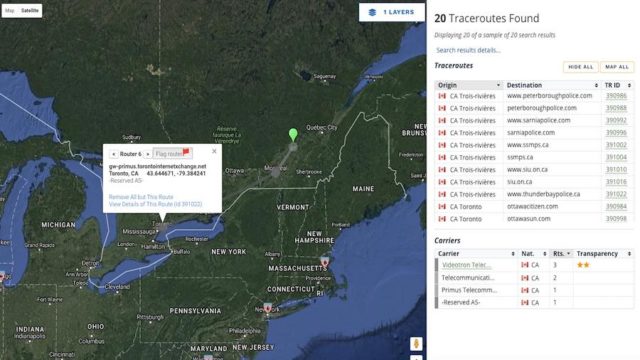
IXmaps is an online interactive map that can be used to see if your web traffic is being spied on by the NSA. IXmaps is created with the help of OpenMedia and some Canadian organizations. This tool finds out if the path taken by your data involves some NSA listening port.

You might be knowing that your web traffic isn’t private and many government agencies are continuously listening to it. But, did you ever wish for a tool that can show you the same? Well, there’s now an interactive map for that.
Internet Exchanges Maps, also called IXmaps, wants to show the “secret, dangerous, often illegal form of surveillance.” Re-launched for public use a couple of days ago, IXmaps shows you how easily your data can be spied on by tracing the routes your data takes. You can visit the map page to view the same.
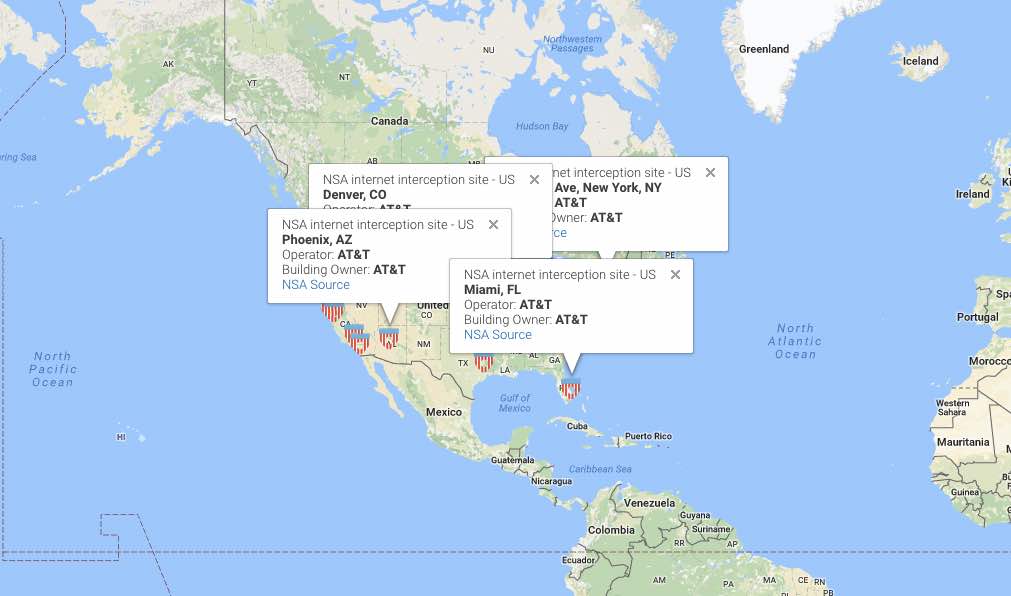
IXmaps is based on Google Maps and shows National Security Agency’s (NSA) traffic interception locations. It should be noted that Snowden’s documents from 2013 told that NSA has a large network of 80 listening ports.
The points you see in the map are the buildings where your information passes through physical wires, also called traceroutes.nsa ixmaps
This project is being developed since 2008. The current version of IXmaps has been developed with the help from OpenMedia, the Canadian Internet Registration Authority, and Office of the Privacy Commissioner of Canada.
IXmaps website says that it relies on the anonymized traceroute data contribution. With time, thanks to 600+ contributors, the database has grown to more than 170,000 traceroutes. You can also contribute to IXmaps data by following the instructions given on this page.
Did you find IXmaps interesting? Is NSA listening to your web traffic? Don’t forget to share your views.

Comments

Follow Us

WHAT'S HOT

How To Connect Android or iOS Phone To Windows 10

The  Continue on PC  feature is currently available to Windows Insiders, but it’ll arrive for regular users once the update starts landing on their PCs. If you’re running an Insider build, you can use the steps mentioned in this post to connect your phone to Windows 10 PC.

Poco F2 Pro 5G Officially Launched Globally With Snapdragon 865

After months of wait, Poco has officially launched Poco F2 Pro. The phone is a sequel to the Poco F1 which was a huge success for the company back in 2018. It is also the second Poco contender in 2020. In February, the Poco brand revealed a new phone lineup and launched Poco X2. The phone was priced at Rs 15,999 and featured similar specs of Redmi K30, a Xiaomi flagship that was launched back in 2018. The company has applied the same strategy for today’s launch. As we expected, Poco F2 Pro bundles all the specs of Redmi K30 Pro that Xiaomi launched last month. Poco F2 Pro Specifications, Availability and Price Unlike the Poco X2, the phone offers a circular camera at the back and a pop-up selfie camera at the front as opposed to the regular dual-hole punch cutout on the display of Poco X2. Poco F2 Pro comes with a 6.67-inch FHD+ AMOLED display with a 92.7% screen to body ratio. On top of that, the phone has an in-display fingerprint sensor to keep up with...

Learn How To Activate iOS 11 Dark Mode

Apart from all the major iOS 11 features and changes, there are some hidden and minor features as well. In this release, Apple has included a feature named Smart Invert Colors, which is the closest you can get while looking for an iOS 11 dark mode.

Qualcomm Announces Its First 5G Network With X50 Modems

Qualcomm  published  in its official OnQ blog that the 5G data connection demonstration achieved gigabit download speeds using several 100 MHz 5G carriers. The demonstration utilized new 5G Protocol R&D Toolset and the UXM 5G Wireless Test