
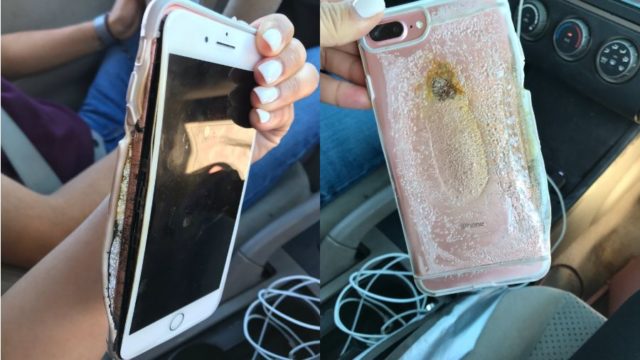
Viral Video Shows A Smoking iPhone 7 Plus Melting, Apple Says They’re “Looking Into It”


Apple iPhone 7 Smoke Video
Brianna Olivia, a resident of Tucson, Arizona posted a video on Twitter showing smoke coming out of her iPhone 7 Plus. A day before, she took the device to Apple Care after she had trouble turning it on, but the representatives encountered no problem. Apple is aware of the iPhone and the video. They are running tests to know the cause of the incident.

After many reports of iPhone 7 devices bursting into flames, finally, someone has managed to record an incident in a video. Spotted by Mashable, the video shows flames coming out of a melting iPhone 7. It was recorded by the boyfriend of Arizona-based Brianna Olivas who’s the owner of the iPhone 7 Plus Rose.
Olivas told Mashable that she had been using official Apple charger for her iPhone 7 Plus Rose. She had no issues with the device until a few days ago when she started facing problems while turning on the iPhone. She took it to Apple care, but the representatives weren’t able to find any faults.
The incident took the very next day after she visited Apple Care. She said her iPhone was charging in the morning next to her head. Her boyfriend kept it on the dresser. He was about to visit the restroom when saw the iPhone “steaming and heard a squealing noise.” He was quick to throw the phone into the restroom, where the phone blew up and iPhone started releasing smoke.
Apple is investigating the device and problem that may have caused the iPhone 7 to burst into flames. Olivia is in touch with Apple and they might come up with a conclusion in about a week’s time.
Would you like to tell about any smartphone incident? Drop your thoughts and feedback.
Here is a bonus video:

Comments

Follow Us

WHAT'S HOT

How To Connect Android or iOS Phone To Windows 10

The  Continue on PC  feature is currently available to Windows Insiders, but it’ll arrive for regular users once the update starts landing on their PCs. If you’re running an Insider build, you can use the steps mentioned in this post to connect your phone to Windows 10 PC.

Poco F2 Pro 5G Officially Launched Globally With Snapdragon 865

After months of wait, Poco has officially launched Poco F2 Pro. The phone is a sequel to the Poco F1 which was a huge success for the company back in 2018. It is also the second Poco contender in 2020. In February, the Poco brand revealed a new phone lineup and launched Poco X2. The phone was priced at Rs 15,999 and featured similar specs of Redmi K30, a Xiaomi flagship that was launched back in 2018. The company has applied the same strategy for today’s launch. As we expected, Poco F2 Pro bundles all the specs of Redmi K30 Pro that Xiaomi launched last month. Poco F2 Pro Specifications, Availability and Price Unlike the Poco X2, the phone offers a circular camera at the back and a pop-up selfie camera at the front as opposed to the regular dual-hole punch cutout on the display of Poco X2. Poco F2 Pro comes with a 6.67-inch FHD+ AMOLED display with a 92.7% screen to body ratio. On top of that, the phone has an in-display fingerprint sensor to keep up with...

Learn How To Activate iOS 11 Dark Mode

Apart from all the major iOS 11 features and changes, there are some hidden and minor features as well. In this release, Apple has included a feature named Smart Invert Colors, which is the closest you can get while looking for an iOS 11 dark mode.

Qualcomm Announces Its First 5G Network With X50 Modems

Qualcomm  published  in its official OnQ blog that the 5G data connection demonstration achieved gigabit download speeds using several 100 MHz 5G carriers. The demonstration utilized new 5G Protocol R&D Toolset and the UXM 5G Wireless Test