
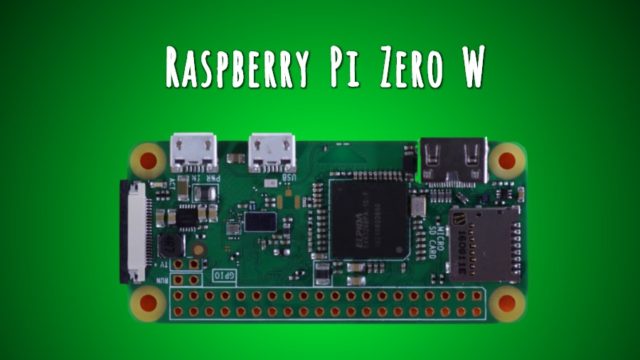
Raspberry Pi Zero W — A Cheap Single Board Computer With Wi-Fi And Bluetooth


raspberry pi zero w
On the occasion of the fifth birthday of Raspberry Pi, the Raspberry Pi Foundation unveiled a new single board computer, Raspberry Pi Zero W. Here, W stands for Wireless as it comes loaded with Wi-Fi and Bluetooth capabilities. Priced at just $10, Raspberry Pi Zero W is powered by 1GHz, single-core CPU, and 512MB RAM.

The Raspberry Pi Foundation announced Raspberry Pi Zero single board computer in October 2015. It was priced just at $5 and offered 40% more computing power as compared to the original Raspberry Pi. Now, the Foundation is back with its new offering on its fifth birthday.
The latest release, Raspberry Pi Zero W, is a new variant of Raspberry Pi Zero, priced at just $10. Here, W stands for Wireless. This release brings Wi-Fi and Bluetooth capabilities to Raspberry Pi Zero.
In its announcement post, the Foundation tells that users often felt the need for wireless connectivity. To answer this issue, Raspberry Pi Zero W is released. For providing Bluetooth 4.0 and 802.11n wireless LAN, Raspberry Pi Zero W uses the same Cypress CYW43438 wireless chip used in Raspberry Pi Model 3.
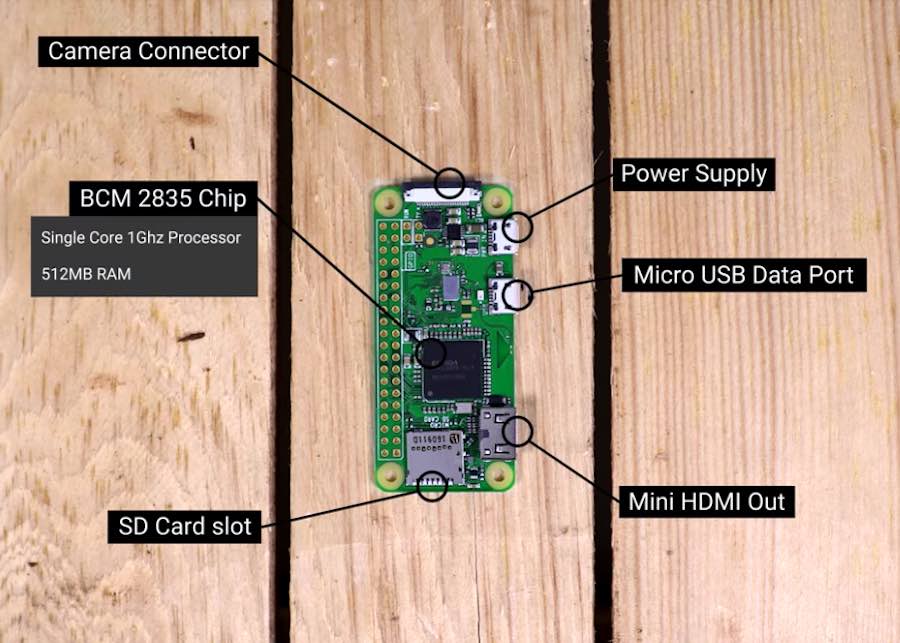
raspberry pi zero q parts
Image: Raspberry Pi

Specifications and features of Raspberry Pi Zero W:

  • 1GHz, single-core CPU
  • 512MB RAM
  • Mini-HDMI port
  • Micro-USB On-The-Go port
  • Micro-USB power
  • CSI camera connector
  • 802.11n wireless LAN
  • Bluetooth 4.0
  • HAT-compatible 40-pin header
  • Composite video and reset headers
The Foundation has also released the official Raspberry Pi Zero W case using the injection-moulding technique. Take a look:
With this release, many new Raspberry Pi Zero distributors have been added. You can find the buy links here.
Are your interested in Raspberry Pi DIYs? Feel free to share your projects and experiences with us.

Comments

Follow Us

WHAT'S HOT

How To Connect Android or iOS Phone To Windows 10

The  Continue on PC  feature is currently available to Windows Insiders, but it’ll arrive for regular users once the update starts landing on their PCs. If you’re running an Insider build, you can use the steps mentioned in this post to connect your phone to Windows 10 PC.

Poco F2 Pro 5G Officially Launched Globally With Snapdragon 865

After months of wait, Poco has officially launched Poco F2 Pro. The phone is a sequel to the Poco F1 which was a huge success for the company back in 2018. It is also the second Poco contender in 2020. In February, the Poco brand revealed a new phone lineup and launched Poco X2. The phone was priced at Rs 15,999 and featured similar specs of Redmi K30, a Xiaomi flagship that was launched back in 2018. The company has applied the same strategy for today’s launch. As we expected, Poco F2 Pro bundles all the specs of Redmi K30 Pro that Xiaomi launched last month. Poco F2 Pro Specifications, Availability and Price Unlike the Poco X2, the phone offers a circular camera at the back and a pop-up selfie camera at the front as opposed to the regular dual-hole punch cutout on the display of Poco X2. Poco F2 Pro comes with a 6.67-inch FHD+ AMOLED display with a 92.7% screen to body ratio. On top of that, the phone has an in-display fingerprint sensor to keep up with...

Learn How To Activate iOS 11 Dark Mode

Apart from all the major iOS 11 features and changes, there are some hidden and minor features as well. In this release, Apple has included a feature named Smart Invert Colors, which is the closest you can get while looking for an iOS 11 dark mode.

How To Schedule Jobs in Linux | Cron and Crontab Commands

While using a computer system, often one faces the need to carry out certain repetitive jobs on a schedule. Instead of manually executing the requisite commands each and every single time, you can make things easier for yourself by using the Linux Cron utility and