

Google has open sourced the code of its E2EMail encryption system, which is available as a simple-to-use Chrome app. Now Google calls it an independent project that exchanges OpenPGP mail. When one launches the E2EMail app, it just shows the encrypted mails. Currently, it just only supports text-based email messages.
oogle introduced E2EMail system as a Chrome app to help people easily exchange private email. Google aimed at crafting an encrypted email solution that wasn’t complex. Now, Google has open sourced the code for this experimental encryption system and its code is available on GitHub.
In its announcement post, Google emphasizes that E2EMail isn’t a Google product, it’s a community-driven open source project. E2EMail is built on a JavaScript Crypto library developed by Google. Compared to a classic OpenPGP client, Google’s open source offering is very simple to install.
With the help of Chrome Extension for E2EMail, the users can integrate OpenPGP into Gmail. This process carefully preserves all the cleartext of the message body exclusively on the client.
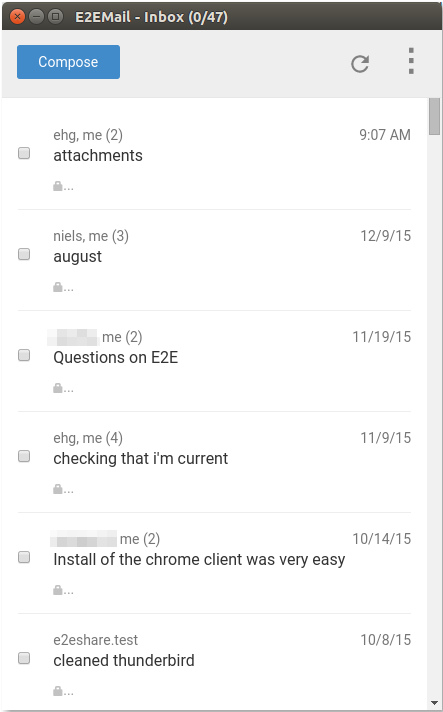
The GitHub page of E2EMail calls it independent of the normal Gmail web interface, which behaves like a sandbox that can only read/write encrypted email. When one launches the app, it only shows the encrypted email in one’s Gmail account.
It should be noted that in its initial version, E2EMail hosts its own keyserver. In future, for better security, Google hopes that it’ll use Google’s evolving Key Transparency method for looking up the keys.
Talking about the limitations, E2EMail only supports text-based email messages, and there’s no email formatting and file attachments. In future releases, the development team hopes to encrypt email headers for better anonymity.
If you’re willing to grab the open source code and start testing, feel free to visit this GitHub link.
Did you find Google’s this open source offering interesting? Don’t forget to share your views and feedback.
Comments
Post a Comment